

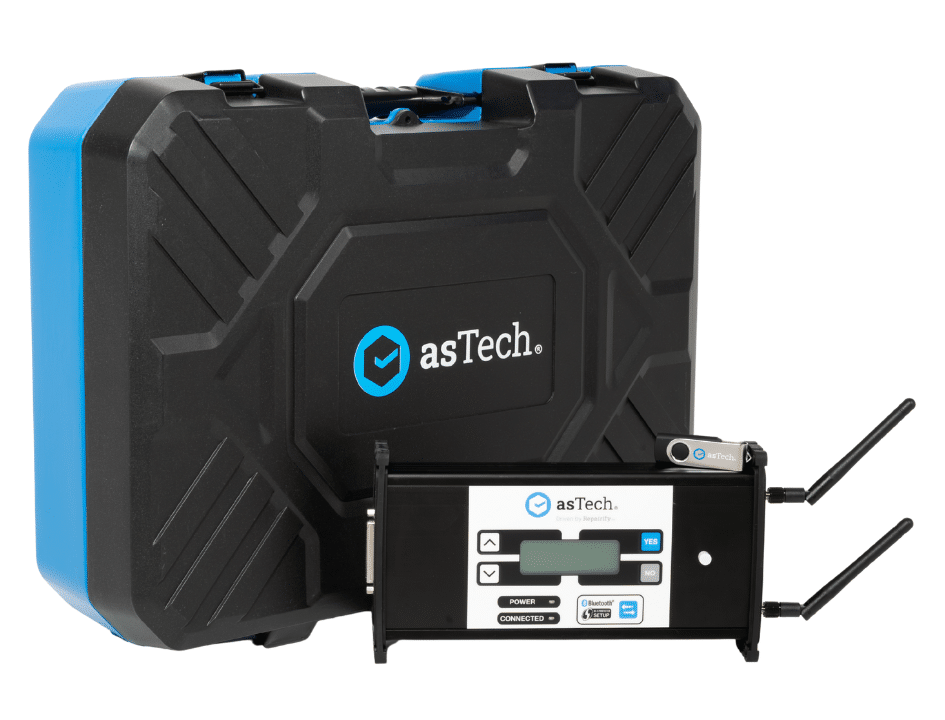
The Ideal Partner for Your Workshop
Keep high-value collision repairs in-house with seamless remote OEM capability. Connect directly to certified remote technicians and factory datacentres for fully compliant OEM scanning, module programming, and ADAS resets.
Request A Quote
Get in touch with our team today to request a tailored, no-obligation quote designed around your workshop’s specific operational requirements.
Book A Demo
See our ADAS calibration tools and remote technology in action to discover how easily they integrate into your daily workshop workflow.
Key Features
Bodyshop Remote OEM Interface
Purpose-built VCI for collision repair centres to perform certified OEM pre/post scans, module programming, and ADAS calibrations without sending cars out.
Integrated Multi-Language App Chat
Connects to the Repairify mobile app with automated multi-language translation, allowing instant communication with remote OEM technicians during complex jobs.
Universal OEM Datacentre Access
Seamlessly connects to Repairify’s vast datacentre of official OEM factory tools and Security Gateway licenses from 1996 and newer vehicle models.
Automated Compliance Documentation
Automatically generates detailed digital repair logs and OEM compliance certificates upon job completion for insurance audit trails.
Technical Specs
Display |
LCD display |
Dimensions |
40 x 250 x 120 mm |
Weight |
0.900 kg |
Connectivity |
Wi-Fi: 802.11 b/g/n Single-Band (2.4GHz) Wired Ethernet 10/100Mbps Wireless Ethernet: FCC ID: Z64-C3100MODR1 Dual Mode Bluetooth 4.1, BLE |
Power Supply |
8-18V input, 12V Typical, 20V MAX, Fused 2A input |
Operating Temperature |
0°C to 60°C |
Benefits

Patented Technology
Simple to connect to the vehicle and contact the Repairify technician via the asTech App, saving time and providing confidence.

Cost Savings
Repairify’s remote services eliminate the need for expensive onsite diagnostic equipment, reducing outsourcing costs and dealership visits.
Compliance and Documentation
Repairs are performed according to OEM standards, crucial for maintaining warranties and regulatory compliance, with a detailed document provided for every service.
Supported Vehicles
Title Here
- Lorem Ipsum Dolor
- Lorem Ipsum Dolor
- Lorem Ipsum Dolor
- Lorem Ipsum Dolor
- Lorem Ipsum Dolor
Title Here
- Lorem Ipsum Dolor
- Lorem Ipsum Dolor
- Lorem Ipsum Dolor
- Lorem Ipsum Dolor
- Lorem Ipsum Dolor
Title Here
- Lorem Ipsum Dolor
- Lorem Ipsum Dolor
- Lorem Ipsum Dolor
- Lorem Ipsum Dolor
- Lorem Ipsum Dolor
Title Here
- Lorem Ipsum Dolor
- Lorem Ipsum Dolor
- Lorem Ipsum Dolor
- Lorem Ipsum Dolor
- Lorem Ipsum Dolor
Title Here
- Lorem Ipsum Dolor
- Lorem Ipsum Dolor
- Lorem Ipsum Dolor
- Lorem Ipsum Dolor
- Lorem Ipsum Dolor
Title Here
- Lorem Ipsum Dolor
- Lorem Ipsum Dolor
- Lorem Ipsum Dolor
- Lorem Ipsum Dolor
- Lorem Ipsum Dolor
Contact Us For Pricing
Ready to learn more? Contact us for pricing and find the right solution for your business.
Resources
Guides & Downloads
Access step-by-step technical instructions and practical tutorials to help your team easily set up, operate, and get the most out of your equipment.
Videos
Watch quick, step-by-step video walkthroughs to help your team master equipment setup, software workflows, and daily workshop operations.
FAQs
Find quick answers to common questions about product compatibility, technical setup, and ongoing workshop support.
